draft.build

Draft the plan.
Take off the build.

Construction CAD in the browser. Live 3D via PlanMesh. Quantities, cut lists, and materials from the same model.

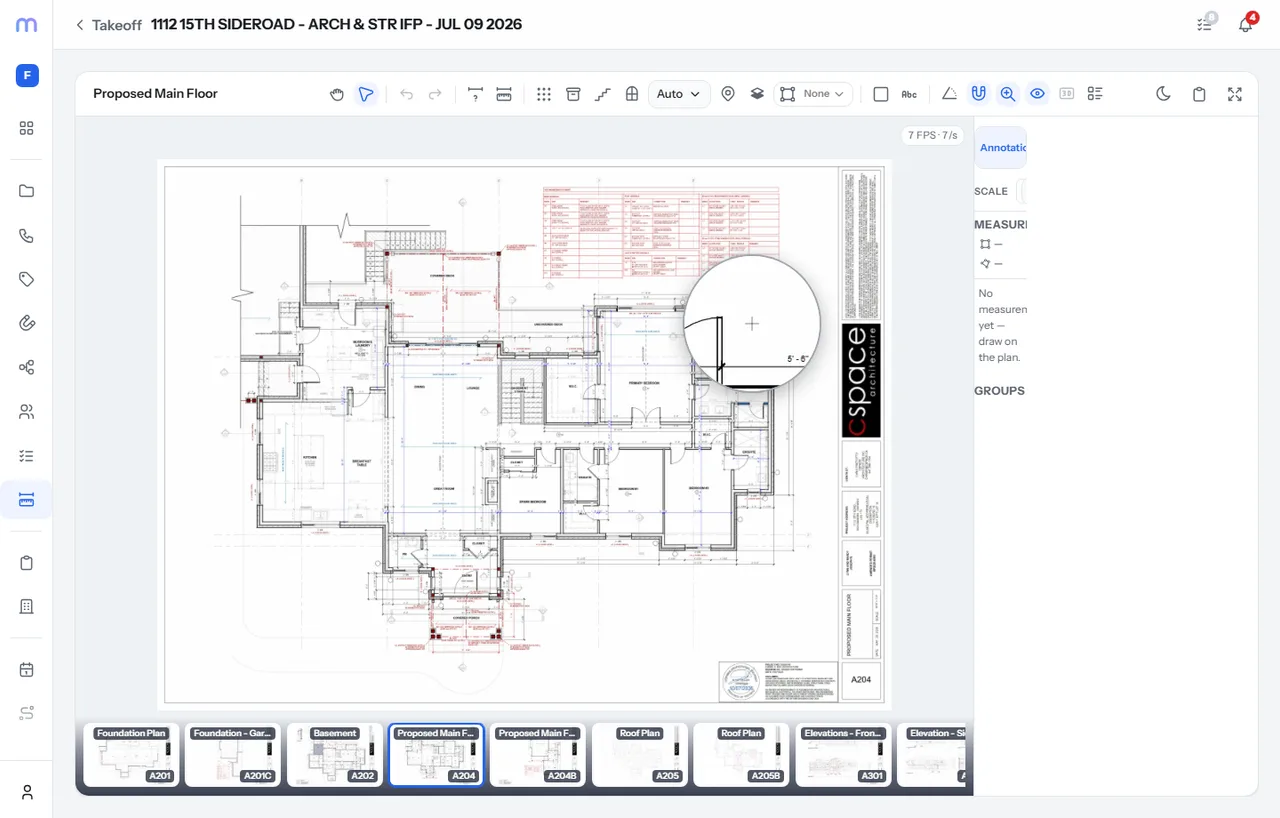
draft.build editor showing a construction plan with live takeoff

The product

CAD first. Takeoff that follows the model.

draft.build is not PDF markup bolted onto a spreadsheet. Draft the building on your sheets, see it in 3D, and take off from what you actually drew.

Flagship capabilities

Draft in CAD. See it in 3D. Take off once.

Construction drafting and takeoff share one model, so the estimate stays honest to the plan.

Construction CAD ยท Studio

Draft the plan. See the build.

Browser CAD on your drawings: walls, framing, openings, cabinets, stairs, and roofs on multi-page sheets, without enterprise desktop prices.

Built on PlanMesh, the real-time rendering engine behind draft.build. Materials and assemblies draw live as you edit.

  • Browser CAD
  • Live PlanMesh 3D
  • Assemblies & layers
  • Multi-page sheets
draft.build CAD workspace with plan geometry and 3D preview
Takeoff & materials

Quantities from the model you drafted.

Takeoff, cut lists, and bill of materials come from the same CAD model and material layers. Change the plan, and the quantities stay tied to what is actually there.

  • Model-driven takeoff
  • Cut lists
  • BOM rollups
  • Material layers
draft.build material takeoff and layer view on a construction plan

The grind without model-driven takeoff

Markup in one tool. CAD in another. Spreadsheets that never match the drawing. You need one place to draft the plan and take off the build.

Why draft.build

One model from draft to takeoff

CAD that knows construction

Walls, framing, openings, cabinets, stairs, and roofs are first-class. You draft how the job builds, not just how it looks on paper.

Construction CAD drafting on a plan sheet in draft.build

3D that stays honest

PlanMesh renders materials and assemblies as you work, so you catch conflicts and missing pieces before the estimate ships.

Live material layers rendered with PlanMesh in draft.build

Takeoff without a second pass

Quantities, cut lists, and BOM are driven by the model. Less re-measuring. Fewer mismatches between the drawing and the buy list.

Takeoff quantities generated from the draft.build model

Assemblies & layers

Attach real material stacks to geometry so takeoff knows what you meant to build.

Multi-page projects

Keep sheets together in one project instead of scattering markups across files.

Works with Mogul

Open draft.build from Mogul when your ops stack already lives there, or go standalone.

Browser-native

No desktop install. Sign in, open a project, and draft on any machine you already use.

Simple flow

From blank sheet to takeoff in 3 steps

  1. 1

    Open your plans

    Start a project, bring in your sheets, and set the workspace for the job you are drafting.

  2. 2

    Draft the build

    Place walls, framing, openings, cabinets, stairs, and roofs. Watch PlanMesh draw the 3D as you go.

  3. 3

    Take off the model

    Pull quantities, cut lists, and materials from what you drafted. Same model, one source of truth.

Pricing

Simple plans. Serious CAD depth.

Early access targets below. Final packaging may shift before launch. Billed monthly.

Via Mogul

Add-on

When you already run Mogul

  • Same draft.build workspace
  • Provisioned through Mogul
  • One seat path for your team
Join waitlist

Custom

Quote

Teams & volume

  • Multi-seat packaging
  • Onboarding help
  • Talk to us
Contact sales

Questions

Common questions

Is draft.build only takeoff?

No. draft.build is construction CAD first. You draft walls, framing, openings, cabinets, stairs, and roofs on plan sheets. Takeoff quantities, cut lists, and materials come from that same model.

What is PlanMesh?

PlanMesh is the real-time 3D rendering engine behind draft.build. As you edit the plan, materials and assemblies draw live so you can see the build while you draft.

Does draft.build work with Mogul?

Yes. Mogul can provision seats and open draft.build for your team. You can also use draft.build with a direct account. Either way you get the same CAD and takeoff workspace.

Do I need desktop CAD software?

No install required. draft.build runs in the browser. Open a project, draft on your sheets, and take off from the model without a separate desktop CAD license.

Can I get cut lists and a bill of materials?

Yes. Cut lists and material quantities are driven by the CAD model and assemblies you place, so takeoff stays tied to what you drafted instead of a separate markup pass.

Ready to draft the plan?

Join the waitlist. We will reach out when early access opens. Draft the plan. Take off the build.